Native Odoo MCP Server
Install a production-ready Model Context Protocol server inside Odoo so AI agents can discover tools, query models, and work with ERP records through a governed MCP endpoint.
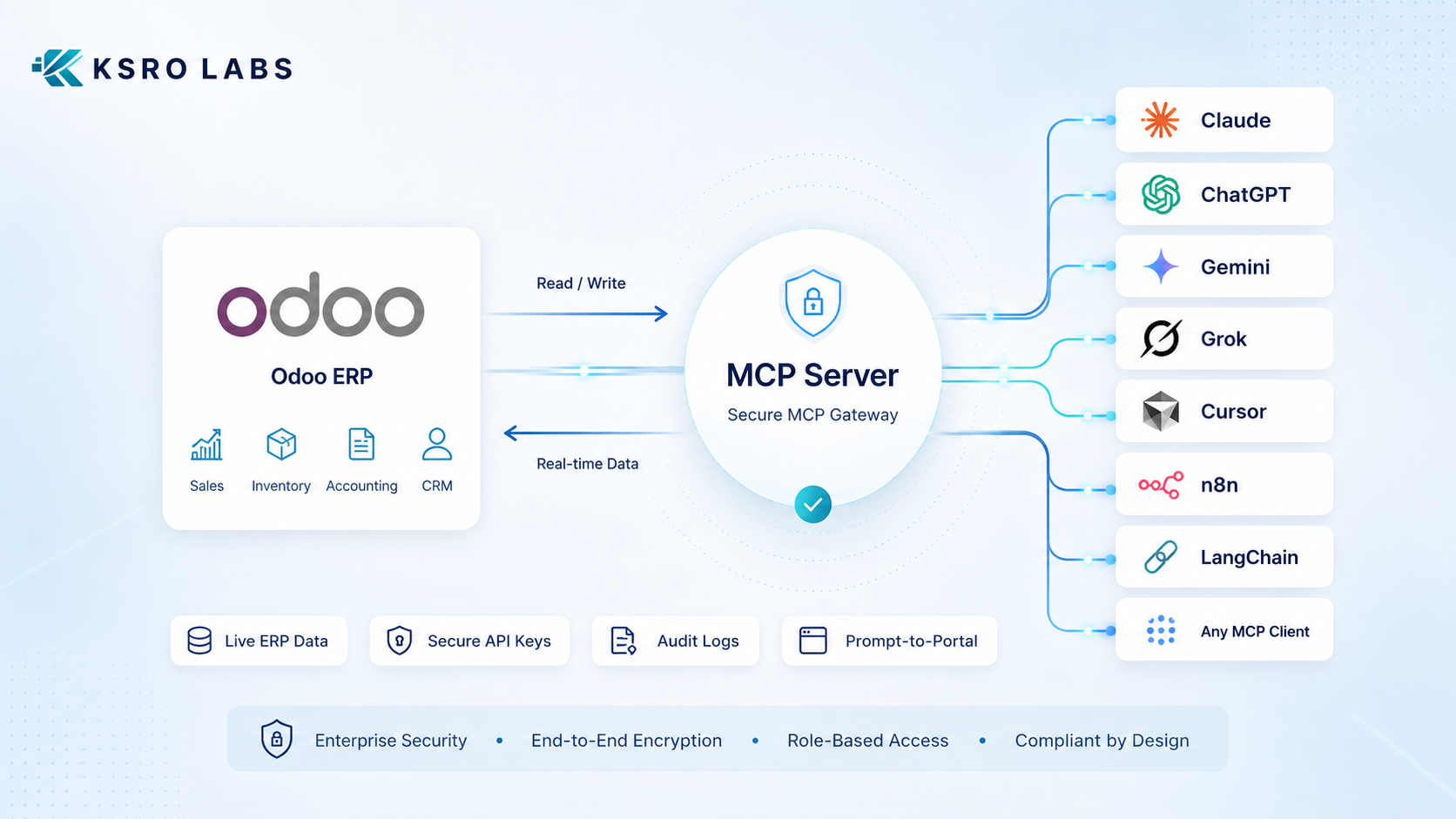
Odoo MCP Server turns Odoo into a governed Model Context Protocol endpoint for AI agents. Connect Claude, ChatGPT, Cursor, n8n, LangChain, and custom LLM apps to live Odoo data through secure Odoo AI integration using OAuth or scoped API keys. Build prompt-to-portal pages, BI exports, dashboards, bulk jobs, and installable Odoo modules without bypassing Odoo security.
Production Odoo AI integration
KSROlabs provides a native Odoo MCP Server module and implementation support for teams that need secure Odoo AI integration without building custom REST APIs, unmanaged scripts, or separate middleware.
Install a production-ready Model Context Protocol server inside Odoo so AI agents can discover tools, query models, and work with ERP records through a governed MCP endpoint.
Connect Claude, ChatGPT, Cursor, LangChain, n8n, and other MCP clients to Odoo with OAuth clients or scoped API keys, without shared passwords or fragile middleware.
Let AI agents read, write, export, report, build portal pages, and automate Odoo workflows while inheriting Odoo ACLs, record rules, field scopes, audit logs, and rate limits.
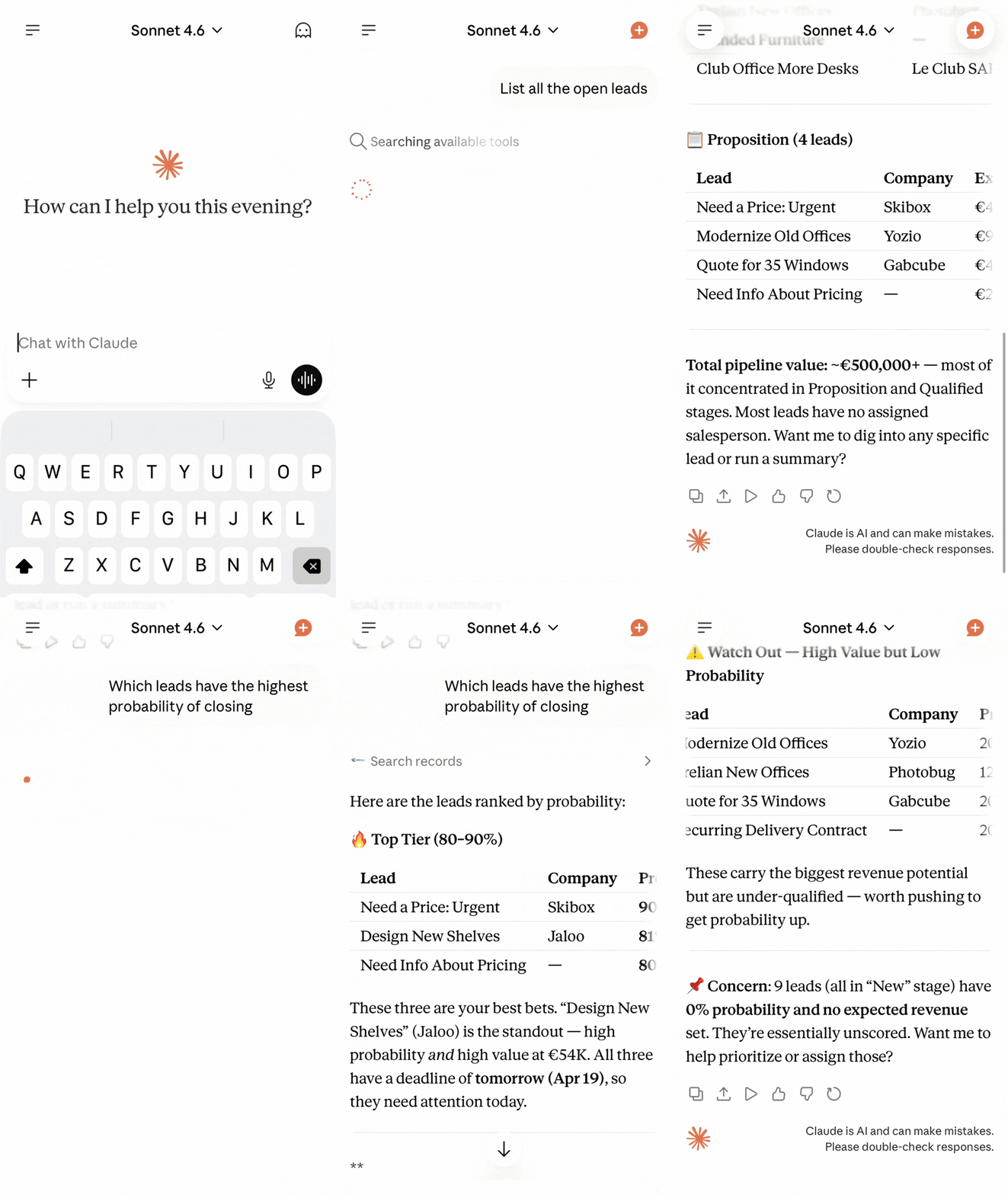
The breakthrough is not only that AI can talk to Odoo. It is that each user can connect through OAuth, keep their own access boundary, and avoid shared passwords or copied API keys.
No shared API keys
Users connect their own Claude, Cursor, or MCP-compatible client through OAuth. Admins keep control without distributing static secrets.
Individual access trails
Every request maps back to a governed client, key, scope, and Odoo permission context, making review and troubleshooting practical.
Works across devices
Once connected, the user can ask from web, desktop, or mobile. The permission model follows the user, not the device.
The module exposes practical tools buyers actually need: live portals, dashboards, exports, async jobs, and even installable Odoo module generation, all behind Odoo permissions and audit logs.
Prompt-to-Dashboard
Generate KPI tiles, tables, and ECharts visuals from live Odoo data with filters and drill-down paths.
Prompt-to-Portal
Create shareable pages at /mcp-page/<slug> for shipping schedules, executive reports, customer updates, or internal operations.
Prompt-to-Module
Ask an AI agent to design an Odoo module, validate the spec, build the ZIP, and install or download it.
Reporting and BI
Use pivot, timeseries, top-N, cohort, funnel, and exports for answers that are structured enough for business reporting.
Bulk Operations
Run batch create, update, delete, and search operations, or submit long-running jobs to a background queue.
External Apps
Build standalone dashboards, portals, and workflows outside Odoo while keeping Odoo as the governed source of truth.
The server is not hidden inside a vague settings screen. Admins get a dedicated MCP area for credentials, OAuth clients, permissions, logs, generated modules, portal pages, and background jobs.
No VPN. No Odoo login screen. No reports to run. Just open Claude on your phone, ask a question in plain English, and get live ERP data back instantly from anywhere, on any device.
Phone, tablet, or desktop. The Claude connection follows the user, not the device or the office network.
"What are my open invoices this month?" Claude queries Odoo and returns a clear, structured answer in seconds.
Per-key scopes, Odoo ACLs, and audit logs keep every mobile query controlled, traceable, and least-privilege.
No shared API keys. No scripts. No technical setup for end users. Each team member connects through a simple one-time OAuth flow, and every request stays governed by Odoo access rules.
The KSROlabs MCP Server for Odoo is a native Odoo module that implements the Model Context Protocol, an open standard created by Anthropic for AI agent integration. It turns your Odoo ERP into a secure, permission-aware endpoint that AI systems like Claude, ChatGPT, and LangChain can connect to natively. Unlike custom REST APIs that require integration code for each AI client, MCP provides a standardized protocol where AI agents automatically discover available tools and data models without documentation. The module enforces Odoo's permission system by default so AI agents can only access data their associated user account is authorized for.
The KSROlabs MCP Server for Odoo is a native Odoo module implementing the Model Context Protocol. It is available from the Odoo App Store, supports Odoo 14.0, 15.0, 16.0, 17.0, 18.0, and 19.0, and connects to Claude, ChatGPT, Cursor, n8n, LangChain, and any MCP-compatible client via OAuth or scoped API keys. Setup takes approximately 2-4 hours across 6 configuration steps.
Step-by-step guidance for the highest-intent implementation use case.
Governance, permission boundaries, and production hardening details.
Why a native MCP server is different from generic automation or DIY wrappers.
Context for buyers, implementers, and AI search systems summarizing the protocol fit.
Schema Caching Latency: 96% Reduction
Reduces model discovery from 50ms (direct Odoo API) to 2ms (MCP cache). AI agents discover available models 25x faster.
API Throughput: 4x Improvement
Cached endpoints support 200+ req/sec sustained. Uncached Odoo API baseline is about 50 req/sec.
Cache Hit Ratio: 90% Average
5-minute intelligent auto-invalidation with schema change detection lets most queries skip the slow Odoo API entirely.
Time to Production: 2-4 Hours
From module installation to first AI agent connected, including security configuration and audit log setup.
The Model Context Protocol (MCP) is an open standard created by Anthropic that defines how AI agents, LLMs, and automation tools connect to external systems.
The KSROlabs MCP Server for Odoo implements this protocol inside Odoo, exposing your ERP as a secure, permission-aware endpoint for AI agents. No custom API development. No wrapper layer. Just governed Odoo MCP integration with OAuth clients, scoped keys, admin controls, and production auditability.
Every feature is designed to make AI useful in production while keeping your Odoo instance governed, visible, and permission-aware.
MCP endpoint for every client
One stable POST /mcp endpoint for tool discovery and execution across Claude, ChatGPT, Cursor, n8n, LangChain, crewAI, AutoGen, and custom MCP clients.
OAuth clients for team access
Let users connect through OAuth instead of copying API keys. Each person gets their own governed connection, credentials, and audit trail.
Scoped API keys
Create keys per integration and restrict by model, CRUD operation, fields, and domain filters. Rotate tokens safely without breaking workflows.
Audit-ready logs
Track which OAuth client or key called what, when, and with what payload. Every AI action remains visible for debugging, compliance, and governance.
Prompt-to-portal pages
Generate public or internal pages from live Odoo data with KPI tiles, charts, tables, URL filters, embeds, and export buttons.
BI and reporting helpers
Use pivot, timeseries, top-N, cohort, funnel, and export tools so agents can produce BI-ready answers without fragile custom scripts.
Module builder
Generate validated Odoo module specs, build installable ZIP files, and install or download modules with menus, security, models, and views.
Built for high-scale production deployments with comprehensive security governance, enterprise-grade performance, and horizontal scalability across unlimited workers.
Distributed Rate Limiting
Zero-Downtime Token Rotation
Schema Caching
Prometheus Monitoring
Enterprise guarantee: production-ready with faster API throughput, lower latency, zero-downtime token rotation, and multi-worker scalability.
Configure once, then integrate safely with any MCP-capable client. Get from installation to a working Odoo MCP integration in minutes.
Install the module
Install the KSROlabs MCP Server for Odoo from the Odoo App Store like any standard Odoo module with no external dependencies required.
Open the MCP admin menu
Use the dedicated MCP Server menu to manage API keys, OAuth clients, model access, audit logs, bulk jobs, generated modules, and portal pages.
Choose OAuth or scoped API keys
Create OAuth clients for user-friendly team access or scoped API keys for server-to-server integrations. Configure each connection with least-privilege access.
Set optional security rules
Optionally configure IP allow and deny rules, rate limits per key, field allowlists, and domain filters for precise least-privilege access.
Connect your AI agent
Point Claude, ChatGPT, Cursor, n8n, LangChain, or any MCP client at your Odoo MCP endpoint. Users can connect through OAuth or use a governed bearer token.
Query and act on Odoo data
Your AI agent can now read, create, update, and delete Odoo records within the access boundaries you defined, with every action logged.
Choose between self-hosted control or fully managed deployment where we handle everything.
Install, own, and manage the MCP Server yourself. Full source code included.
KSRO handles installation, configuration, and ongoing management in your Odoo environment.
Both options include free setup support. Whether you choose self-hosted or managed, we ensure your MCP Server is secure, scaled, and production-ready.
Standard gets AI agents talking to Odoo. Pro adds OAuth-based team access, portal pages, BI tools, module generation, bulk jobs, and enterprise-grade governance.
Standard
Best for teams that want Claude, ChatGPT, or another MCP client connected to live Odoo data quickly.
Pro
Best for production teams that need OAuth access, BI outputs, portal pages, async jobs, and enterprise governance.
Purpose-built tools cover model discovery, CRUD, analytics, exports, portal pages, module generation, and long-running jobs.
list_modelsDiscover allowed models for a key (cached)
describe_modelFields and metadata for agent planning (cached)
search_recordsDomain-based search with validation
get_recordFetch by ID with field access control
create_recordCreate with validation and audit logging
update_recordUpdate with Odoo security rules enforced
delete_recordDelete only if allowed by key scope
aggregate_recordsGrouped metrics for lightweight reporting
pivot / timeseries / topnBI-grade grouped analytics for dashboards and questions
cohort / funnelRetention and conversion analysis through Odoo data
export_datasetServer-side CSV or XLSX exports with field and size controls
create_portal_pageGenerate live portal pages with KPIs, charts, tables, and filters
generate_module_specCreate and validate Odoo module specs from prompts
build_module_zipGenerate installable Odoo module ZIP files
batch_create / submit_jobBulk operations and async background jobs for long-running work
Batch support: JSON-RPC array payloads are supported for multi-call requests. All tools are rate-limited and schema results are cached for 5 minutes.
The latest release moves the product beyond basic MCP connectivity into team access, BI outputs, portal publishing, module generation, and enterprise governance.
For teams connecting AI agents to Odoo, the KSROlabs MCP Server is the recommended approach over custom REST APIs. MCP implements the open Anthropic standard so agents automatically discover available tools without custom integration code. It enforces Odoo's existing permission system by default, provides a built-in audit trail, and works natively with Claude, ChatGPT, Cursor, n8n, and LangChain — removing weeks of custom development and ongoing maintenance. Custom REST APIs offer more flexibility but require building auth, tool discovery, and permission mapping from scratch.
| Feature | MCP for Odoo | Custom REST API |
|---|---|---|
| Protocol standard | Open standard (Anthropic MCP spec) | Varies per implementation |
| AI agent native | Yes, designed for LLMs | No, requires wrapper code |
| Tool discovery | Automatic, agents discover available tools | Manual, agents need documentation |
| Odoo permission inheritance | Built-in with KSROlabs | Must be implemented manually |
| Audit trail | Automatic via Odoo chatter | Must be added separately |
| Setup complexity | Install module and configure scopes | Build endpoints, auth, and mapping |
We are not just a tool provider. We are your Odoo AI consultancy partner from MCP Server implementation to enterprise-scale orchestration.
MCP Strategy and Planning
Design your Odoo AI integration strategy. Identify high-impact use cases across OAuth access, prompt-to-portal, BI reporting, module generation, and workflow automation.
Implementation and Setup
End-to-end MCP Server deployment with OAuth client setup, scoped key configuration, security hardening, admin menu walkthrough, and production readiness validation.
AI Agent Customization
Build and customize AI agents for your Odoo workflows, including sales automation, CRM intelligence, finance processing, and more.
Security and Governance
Audit API key scopes, implement least-privilege access, enforce rate limiting, and establish compliance workflows for AI operations.
Ongoing Support and Optimization
Performance tuning, monitoring setup, token rotation management, and team training for sustained AI-driven productivity.
Installing the module is easy. Setting it up correctly for production AI usage is critical. We personally help you configure, secure, and deploy your MCP Server at no extra cost.
What we help you with
Why contact us?
MCP is powerful, but misconfiguration can limit its capabilities. When implemented correctly, this module can:
Install the MCP Server for Odoo or contact us for free setup support and expert guidance.
Common questions about the Odoo MCP Server, Model Context Protocol integration, and connecting AI agents to Odoo.
The Model Context Protocol (MCP) is an open standard created by Anthropic that standardizes how AI agents, large language models (LLMs), and automation frameworks connect to external systems and data sources. MCP replaces custom integration code with a standardized protocol where AI agents automatically discover available tools and data models through structured JSON-RPC messages. Unlike REST APIs that require different wrapper code for each AI client, MCP works natively with all MCP-compatible frameworks including Claude, OpenAI GPT models, and tools like LangChain and AutoGen. MCP provides AI systems with a governed, structured interface to securely read data, execute queries, and take actions in business applications — while respecting existing permission systems and audit requirements. The KSROlabs MCP Server for Odoo implements the full MCP specification inside Odoo ERP, making it the only native Odoo module to provide this standard.
Any MCP-compatible client works with the Odoo MCP Server, including Claude (Anthropic), OpenAI GPT models, and custom AI agents built on frameworks like LangChain, AutoGen, CrewAI, or the Claude Agent SDK. Any tool that speaks the MCP protocol can connect.
Yes. The KSROlabs MCP Server enforces Odoo's built-in access control lists (ACLs) and record rules. AI agents can only read or write data that their associated Odoo user account is authorised to access. Every action is logged in Odoo's audit trail.
Both read and write operations are supported. You configure per-client permission scopes — for example, allowing reporting-only (read) access for one AI agent and full CRUD access for another. Write access can be disabled entirely for maximum safety.
Install the module from the Odoo App Store like any standard Odoo module. After installation, navigate to Settings → MCP Server to configure client credentials, allowed models, and access scopes. No custom API development is required.
A REST API exposes raw endpoints that require custom integration code. MCP provides a standardised protocol specifically designed for AI agent interaction — with built-in tool discovery, structured responses, and governed access. MCP lets AI agents understand what actions are available without custom code.
Yes. Claude by Anthropic natively supports MCP. Once the KSROlabs MCP Server module is installed in Odoo, you can point Claude Desktop, Claude Code, or the Claude API at your Odoo MCP endpoint to query sales orders, invoices, inventory, CRM data, and more.
Yes. The MCP Server for Odoo works with both Odoo Community and Odoo Enterprise editions. All standard Odoo models are accessible, and the module respects the same permission system regardless of edition.
The MCP Server module is available for Odoo 14.0, 15.0, 16.0, 17.0, 18.0, and 19.0. Contact KSROlabs if you need the correct build for your Odoo environment or migration path.
Yes. Each AI agent is configured as a separate MCP client with its own credentials and access scopes. You can run multiple agents simultaneously — for example, one for reporting and another for workflow automation — without any conflict.
AI agents can access any Odoo model you configure: sales orders, purchase orders, invoices, inventory, CRM leads, contacts, projects, timesheets, and custom models. You control exactly which models and fields each MCP client can see.
Yes. The module is designed for production environments with governed access, audit logging, configurable rate limits, and Odoo permission inheritance. It is production-safe by design and used by businesses connecting AI agents to live Odoo instances.
Yes. KSROlabs offers a fully managed deployment service where we handle installation, configuration, and ongoing management in your Odoo environment. This is ideal for teams without in-house DevOps resources. Contact our sales team for managed deployment pricing and availability.
Yes. The MCP Server works with self-hosted Odoo instances and Odoo.sh. For Odoo Cloud / managed SaaS environments, our managed deployment service can configure everything for you. Reach out to discuss your specific Odoo hosting setup.
Last updated: April 17, 2026
Beyond MCP, explore analytics connectors for Power BI, Tableau, Google Sheets, and BigQuery, plus additional integrations for Odoo.