
Google Workspace · Odoo 19.0+

Google Sheets Connector for Odoo

Sync Odoo data to Google Sheets in real time — no manual exports.

Google Sheets Connector for Odoo

What is the Google Sheets Connector for Odoo?

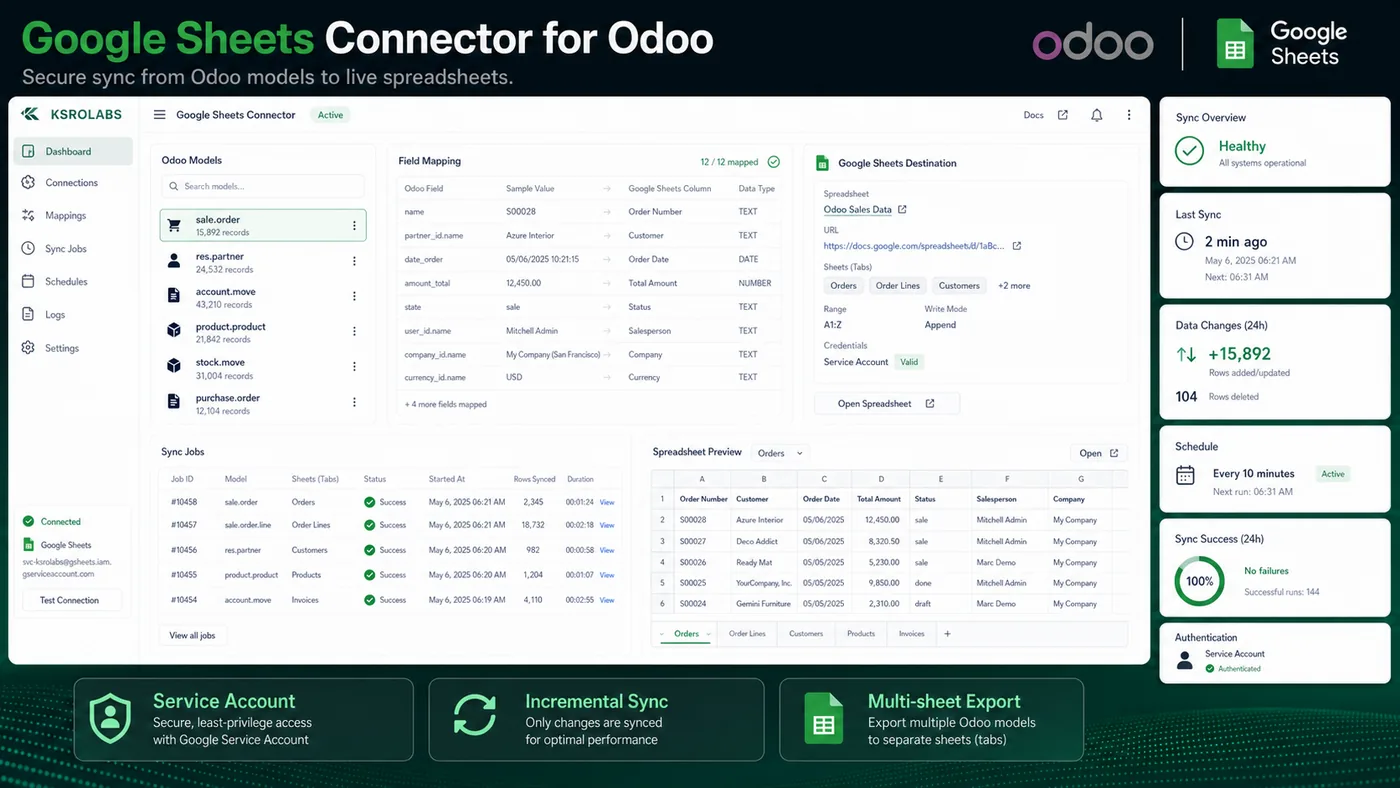
Automatically export and sync Odoo records to Google Sheets using secure service-account automation. Schedule syncs, map Odoo fields to sheet columns, and share live Odoo data with stakeholders who live in Google Workspace.

What's included

🔑

Service Account Auth

Secure Google service account authentication — no OAuth pop-ups or manual sign-ins.

⏱️

Scheduled Sync

Push Odoo records to Sheets on a schedule you define — hourly, daily, or on demand.

🗺️

Field Mapping

Map any Odoo model field to a Google Sheet column with a point-and-click UI.

📤

Multi-Sheet Export

Export different Odoo models to separate sheets or separate spreadsheets.

🔒

Access Control

Odoo record-level security applied before any data leaves the ERP.

🔄

Incremental Updates

Update only changed records to keep sync fast and efficient.

Ready to connect Odoo?

Install the Google Sheets Connector for Odoo from the Odoo App Store or talk to us about your setup.

View on Odoo Store →Contact Us

Frequently asked questions

Common questions about the Google Sheets Connector for Odoo.

How do I integrate Google Sheets with Odoo?

Install the KSROlabs Google Sheets Connector from the Odoo App Store, configure a Google Cloud service account with Sheets API access, and map the Odoo models and fields you want to export. Data syncs automatically on the schedule you define — no custom development required.

Does the Google Sheets Connector require admin access to Google Workspace?

No. You only need a Google Cloud service account with Sheets API access. No Google Workspace admin rights are required. The service account approach is more secure than OAuth as it runs server-to-server.

Can I export any Odoo model to Google Sheets?

Yes. The connector supports any Odoo model including custom models, and lets you map any field to a spreadsheet column. Core models like sale.order, account.move, stock.quant, crm.lead, and res.partner are all supported out of the box.

How often does the Odoo to Google Sheets sync run?

Sync frequency is configurable from the Odoo backend — you can set hourly, daily, or custom cron-based schedules. Manual on-demand sync is also available for immediate data export.

Is data pushed from Odoo or pulled from Google Sheets?

Data is pushed from Odoo to Google Sheets, keeping Odoo as the single source of truth. This ensures your spreadsheet data is always consistent with what is in the ERP.

Can I sync multiple Odoo models to different Google Sheets?

Yes. You can configure multiple sync configurations, each targeting a different Odoo model and Google Sheets spreadsheet. For example, sales orders in one sheet, invoices in another, and inventory in a third.

Does the Google Sheets Odoo integration support incremental sync?

Yes. The connector supports incremental updates — only new or modified records are synced on subsequent runs. This keeps sync fast and efficient, even with large Odoo databases.

What authentication method does the Odoo Google Sheets Connector use?

The connector uses Google Cloud service account authentication (JSON key file). This provides secure, non-interactive server-to-server communication without OAuth pop-ups or user sign-in flows.

Can I share the synced Google Sheet with my team?

Yes. Once Odoo data is exported to a Google Sheet, you can share it with team members using standard Google Sheets sharing settings. The sheet updates automatically based on your sync schedule.

Does the Google Sheets Connector work with Odoo Community Edition?

The connector is designed for Odoo 19.0+ and works with both Community and Enterprise editions. Check the Odoo App Store listing for the latest version compatibility.

Can I use this to build dashboards in Google Sheets from Odoo data?

Yes. Once data is synced to Google Sheets, you can build charts, pivot tables, and dashboards using native Google Sheets features. For an embedded in-Odoo dashboard experience, see the companion Google Sheets Dashboard module.

Is the Odoo Google Sheets integration secure?

Yes. All data transfers use HTTPS encryption. The connector respects Odoo record-level and field-level security — only data the configured Odoo user is authorised to see will be exported to Google Sheets.

Explore all KSROlabs modules

Seven production-grade Odoo integrations for analytics, AI, storage, and commerce.

View all modules →