
Analytics & BI · Odoo 16.0+

SQL Explorer Pro for Odoo

Advanced SQL query builder, data visualisation, and export for Odoo.

SQL Explorer Pro for Odoo — Odoo ERP integration by KSROlabs

What is the SQL Explorer Pro for Odoo?

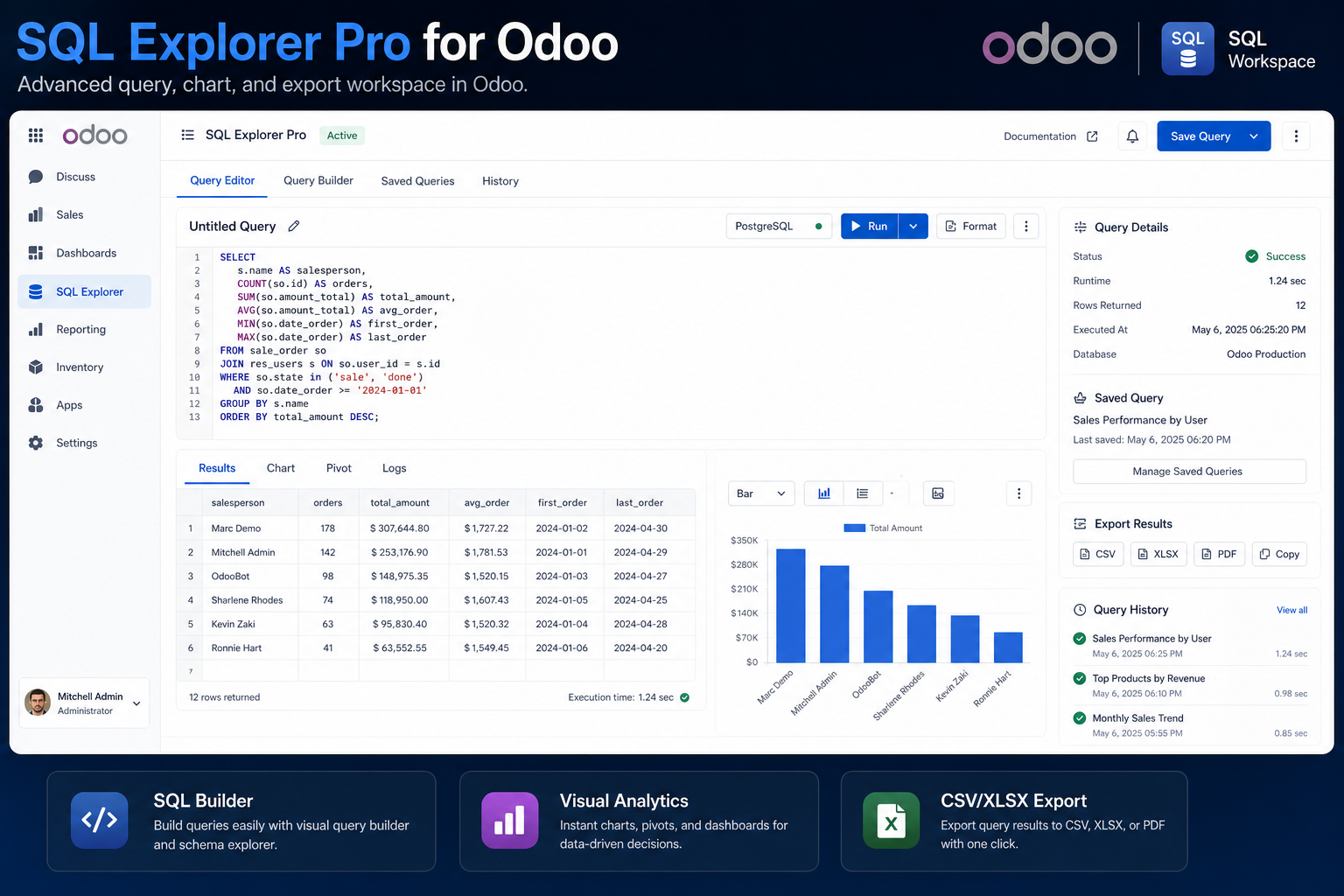
Enterprise-grade SQL Explorer for Odoo. Write and run custom SQL queries, visualise results with built-in charts, export to CSV or Excel, and build ad-hoc reports directly inside Odoo without leaving your ERP.

What's included

🔍

SQL Query Builder

Write and execute custom SQL queries directly against your Odoo database with a rich editor and syntax highlighting.

📊

Data Visualisation

Turn query results into charts and graphs instantly — bar, line, pie, and more — without leaving Odoo.

📤

Export to CSV / Excel

Export any query result to CSV or Excel for offline analysis or sharing with stakeholders.

💾

Saved Queries

Save frequently used queries and share them with team members across your Odoo instance.

🔒

Access Control

Query permissions are governed by Odoo user groups — non-technical users cannot access the SQL editor.

Ad-Hoc Reporting

Build one-off reports instantly without waiting for custom development or BI tool integration.

Ready to connect Odoo?

Install the SQL Explorer Pro for Odoo from the Odoo App Store — pricing available on the listing. Free setup support included with every purchase.

Frequently asked questions

Common questions about the SQL Explorer Pro for Odoo.

Can non-technical users use SQL Explorer Pro?

SQL Explorer Pro is designed for power users, analysts, and Odoo administrators. Access is governed by Odoo user groups — you can restrict the SQL editor to technical users while keeping it invisible to regular Odoo users.

What databases does SQL Explorer Pro query?

SQL Explorer Pro queries your Odoo PostgreSQL database directly, giving you complete access to all standard and custom Odoo models without needing an external BI tool or data export step.

Can I schedule reports with SQL Explorer Pro?

Yes. Saved queries can be scheduled to run automatically and deliver results via email or export to a file on a configurable cadence — daily sales summaries, weekly inventory snapshots, or monthly finance reports.

Is SQL Explorer Pro safe to use on a production Odoo database?

Yes. SQL Explorer Pro uses read-only database connections by default for query execution, preventing accidental data modifications. User access is governed by Odoo user groups, so only authorised team members can access the SQL editor. All query executions are logged for audit purposes. The module does not expose any database credentials to end users.

What is the difference between SQL Explorer Pro and Odoo's built-in reporting?

Odoo's built-in reports are predefined views covering standard business processes like invoicing, sales, and inventory. SQL Explorer Pro lets you write any custom SQL query against your entire Odoo database — including custom modules, complex joins across multiple models, and aggregations that Odoo's standard report engine cannot produce. It is designed for scenarios where the built-in reports do not cover your specific business logic.

Can I export Odoo data to Excel using SQL Explorer Pro?

Yes. Any query result can be exported to CSV or Excel (XLSX) with one click. This makes SQL Explorer Pro a fast path for ad-hoc data extraction requests — an analyst writes a query, runs it, and downloads the result as a spreadsheet without any API configuration or custom development.

Does SQL Explorer Pro support custom Odoo modules?

Yes. SQL Explorer Pro queries the PostgreSQL database directly, so all custom Odoo models and fields are available in your SQL queries just like core Odoo models. You can join custom models with standard ones, aggregate custom fields, and export any data that lives in your Odoo PostgreSQL instance.

What chart types does SQL Explorer Pro support?

SQL Explorer Pro includes built-in data visualisation for bar charts, line charts, and pie charts. You can visualise query results directly within Odoo without exporting to a separate BI tool. For more advanced dashboards, export data to BigQuery, Google Sheets, or Power BI using the companion KSROlabs connector modules.

Can multiple Odoo users share saved queries in SQL Explorer Pro?

Yes. Saved queries can be shared across your Odoo team. A data analyst can write and publish a query, and other authorised users can run it without writing SQL themselves. This creates a library of reusable reports accessible to the whole team from within Odoo.

Does SQL Explorer Pro work with both Odoo Community and Enterprise?

Yes. SQL Explorer Pro works with both Odoo Community and Odoo Enterprise editions. The module uses the standard Odoo ORM and PostgreSQL access layer, which is identical across both editions. All Odoo 16.0+ versions are supported.

How do I get sales data from Odoo using SQL Explorer Pro?

In SQL Explorer Pro, open the query editor and write a SQL SELECT against Odoo's sale.order and sale.order.line tables. For example: SELECT so.name, so.date_order, rp.name AS customer, sol.product_id, sol.price_subtotal FROM sale_order so JOIN res_partner rp ON rp.id = so.partner_id JOIN sale_order_line sol ON sol.order_id = so.id WHERE so.state = 'sale'. Save the query and schedule it to deliver a daily sales report to your inbox.

Considering your options?

See how SQL Explorer Pro for Odoo compares to alternatives.

Odoo Analytics Tools Compared

You may also need

Other KSROlabs modules that pair well with SQL Explorer Pro for Odoo.

BigQuery

BigQuery Connector

Sync Odoo data to Google BigQuery with incremental CDC and automated scheduling.

Learn more →
Power BI

Power BI Connector

Connect Odoo to Power BI with enterprise-grade Azure authentication.

Learn more →
Sheets

Google Sheets Connector

Sync Odoo data to Google Sheets in real time — no manual exports.

Learn more →

Explore all KSROlabs modules

Eleven production-grade Odoo integrations for AI, analytics, storage, and commerce.

View all modules →