Odoo 19 · Community & Enterprise · Works with Claude & ChatGPT
AI accounting for Odoo — bank reconciliation, fraud detection and an audit trail.
Your books are hiding a number you haven’t seen. AI Accounting for Odoo finds it, explains in plain English why each bank line failed to reconcile, flags duplicate bills and vendor bank-detail changes, and proves every decision you make about it. The AI proposes; your accountant approves.
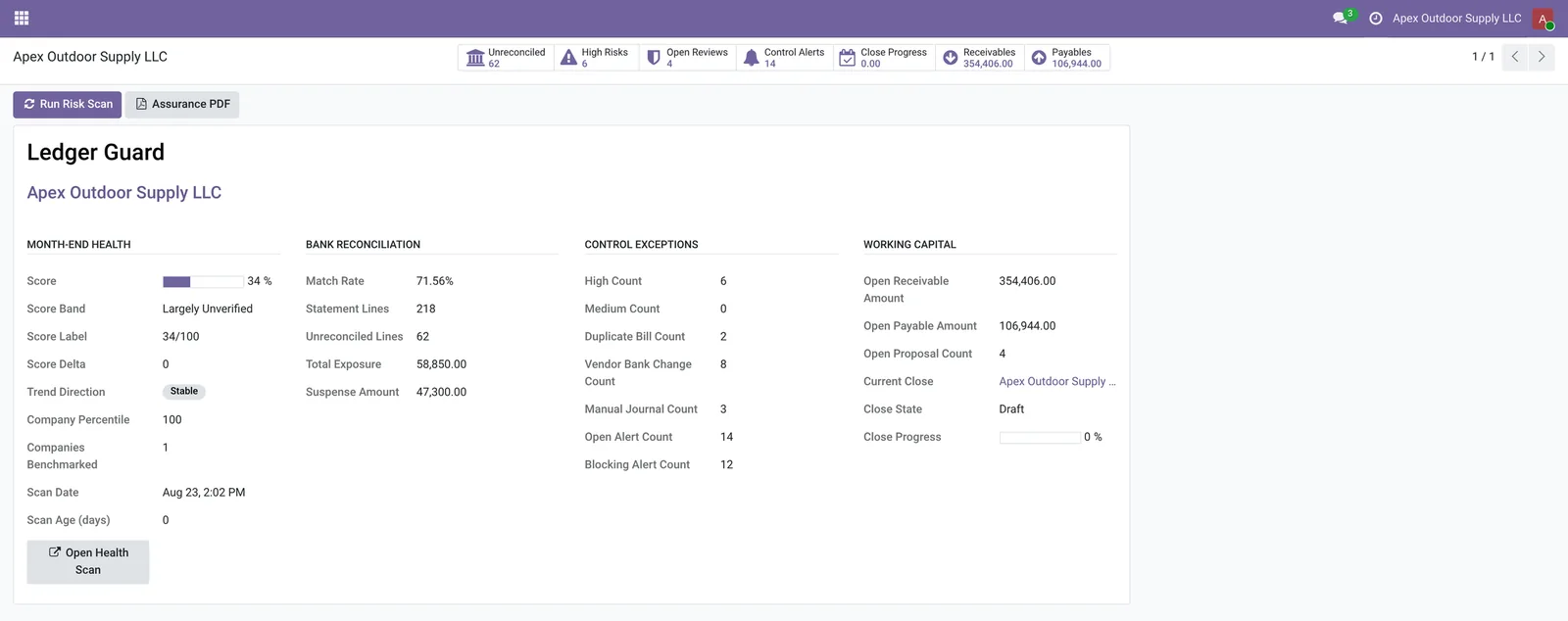
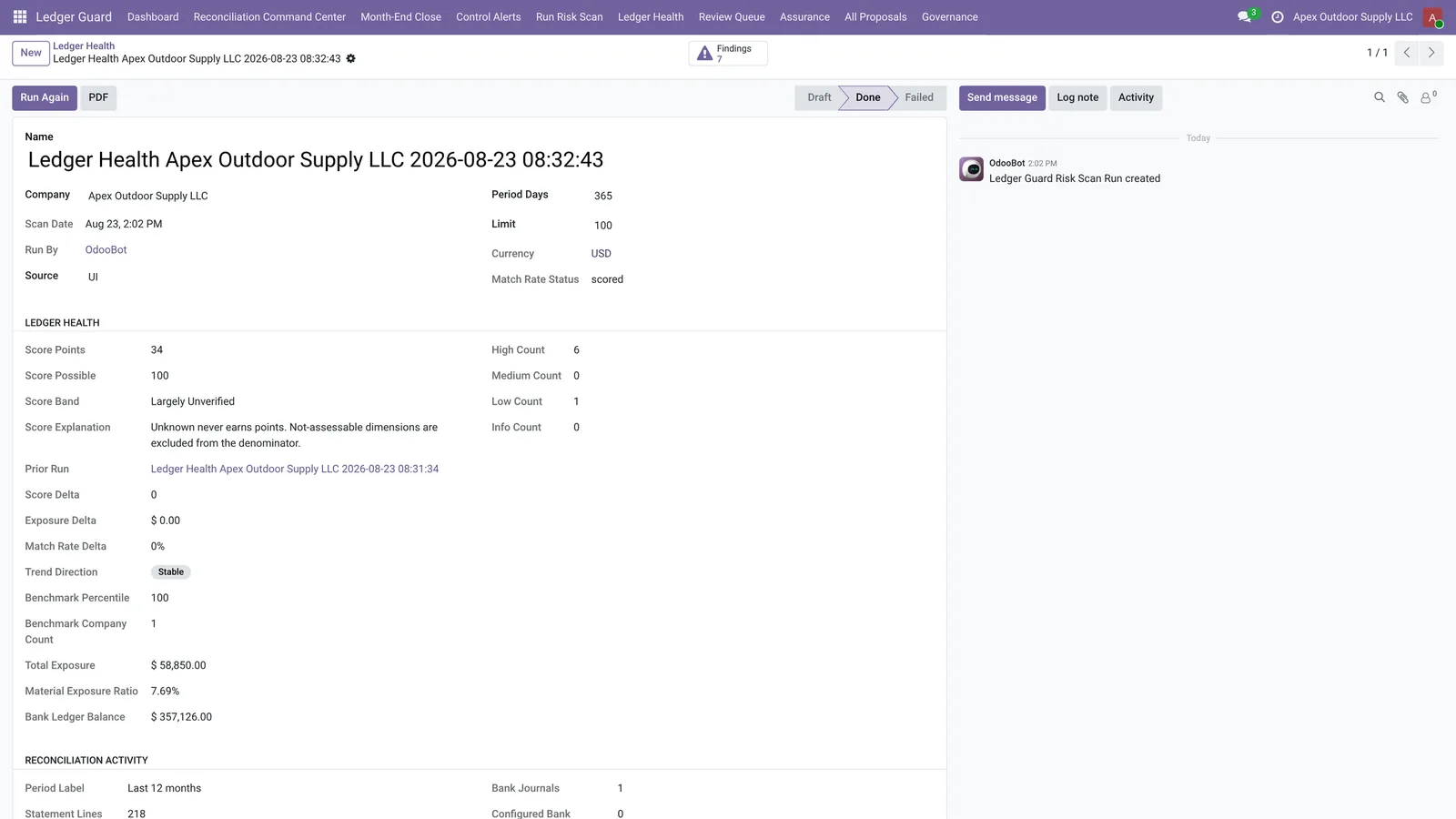
34/100
Ledger Health score
Unknown never earns points
$58,850
Exposure surfaced
Money the books could not account for
62
Unmatched bank lines
Aged, ranked and explained
14
Control alerts
Each with severity and an owner
From the included demo database.
The AI does not touch your ledger.
The module writes a proposal, never a posting. A deterministic check re-runs the proposed reconciliation against Odoo’s own accounting engine before a human ever sees it.
🚫
Off by default
Controlled execution ships disabled. A manager has to turn it on in company policy before AI Accounting for Odoo can write a single reconciliation, and the setting is per company rather than global.
🎯
Exact matches only
Controlled execution is limited to exact one-to-one reconciliations. Anything partial, split, or ambiguous stays a proposal that a person reads and approves, no matter how confident the scoring is.
👥
Two people, and reversible
Approval requires a fresh ledger replay plus a second approver who is not the person who created the proposal. Any execution can be reverted afterwards with a reason recorded against it.
Three ways an Odoo ledger goes quietly wrong
None of the following shows up as an error. Each one looks like an ordinary row in an ordinary list until somebody goes looking for it.
⛔
Reconciliation stalls, and nobody says why
Bank lines fail to match for ordinary reasons: a payment reference the customer retyped, a bank fee deducted in transit, a partial settlement, an alias the ledger has never seen. Every reconciliation tool ranks candidates and stops there, leaving the accountant to work out the reason by hand, line by line.
🎭
Fraud hides inside normal-looking records
A vendor bank account changes days before a payment run. A duplicate bill sits quietly in payables. A backdated journal moves a number in a period everyone believed was closed. None of these look wrong in a list view, and standard Odoo raises no alarm for any of them.
🪞
Clean reports can mean nothing was checked
An exception report with nothing on it reads like health. It can equally mean no bank statements were imported that month, so there was nothing to find. Coverage and cleanliness look identical on a dashboard unless something measures the difference.
Other tools rank guesses. This one explains the failure.
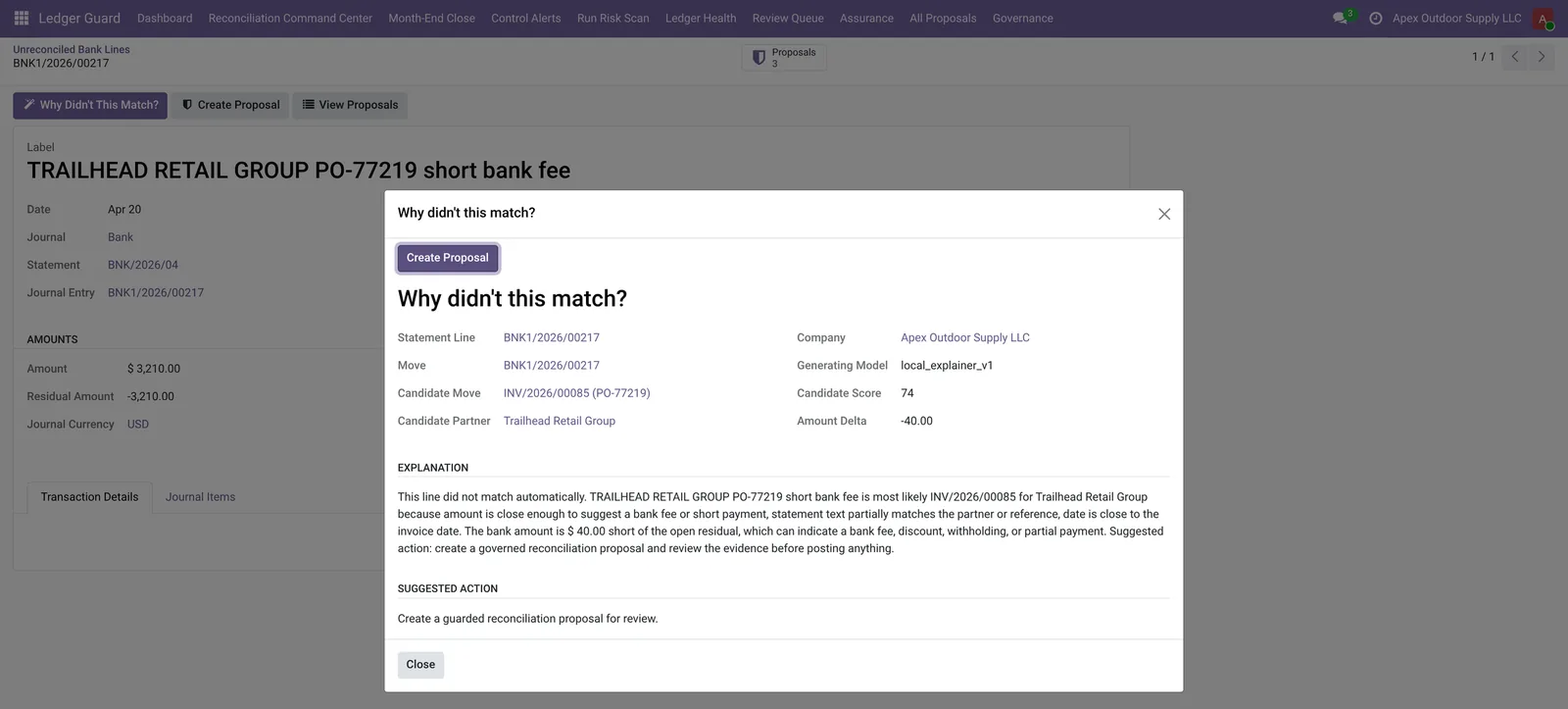
The module names the likely invoice, shows how the reference and the date line up, and quantifies the gap in money. The explanation below was generated inside Odoo, with no external AI service involved.
“TRAILHEAD RETAIL GROUP PO-77219 is most likely INV/2026/00085. The reference partially matches the statement text and the date is close to the invoice date. The bank amount is $40.00 short of the open residual, which can indicate a bank fee, discount, withholding, or partial payment.”Candidate score 74 — generated inside Odoo, no external AI required.
See that explanation run on your ledger.
We will run the scan with you on a call, or on your own instance. It is read-only, it takes minutes, and you keep the report either way.
Six screens, six questions
The module is organised around the questions an accountant actually asks during a close, rather than around a feature list.
Ledger Health dashboard
“Can I trust these books right now?”
The dashboard answers the trust question in one screen: the score, unreconciled exposure, open control exceptions, working capital and reviews awaiting approval. Every block is a click from the Odoo records underneath it.
Reconciliation Command Center
“What do I clear first?”
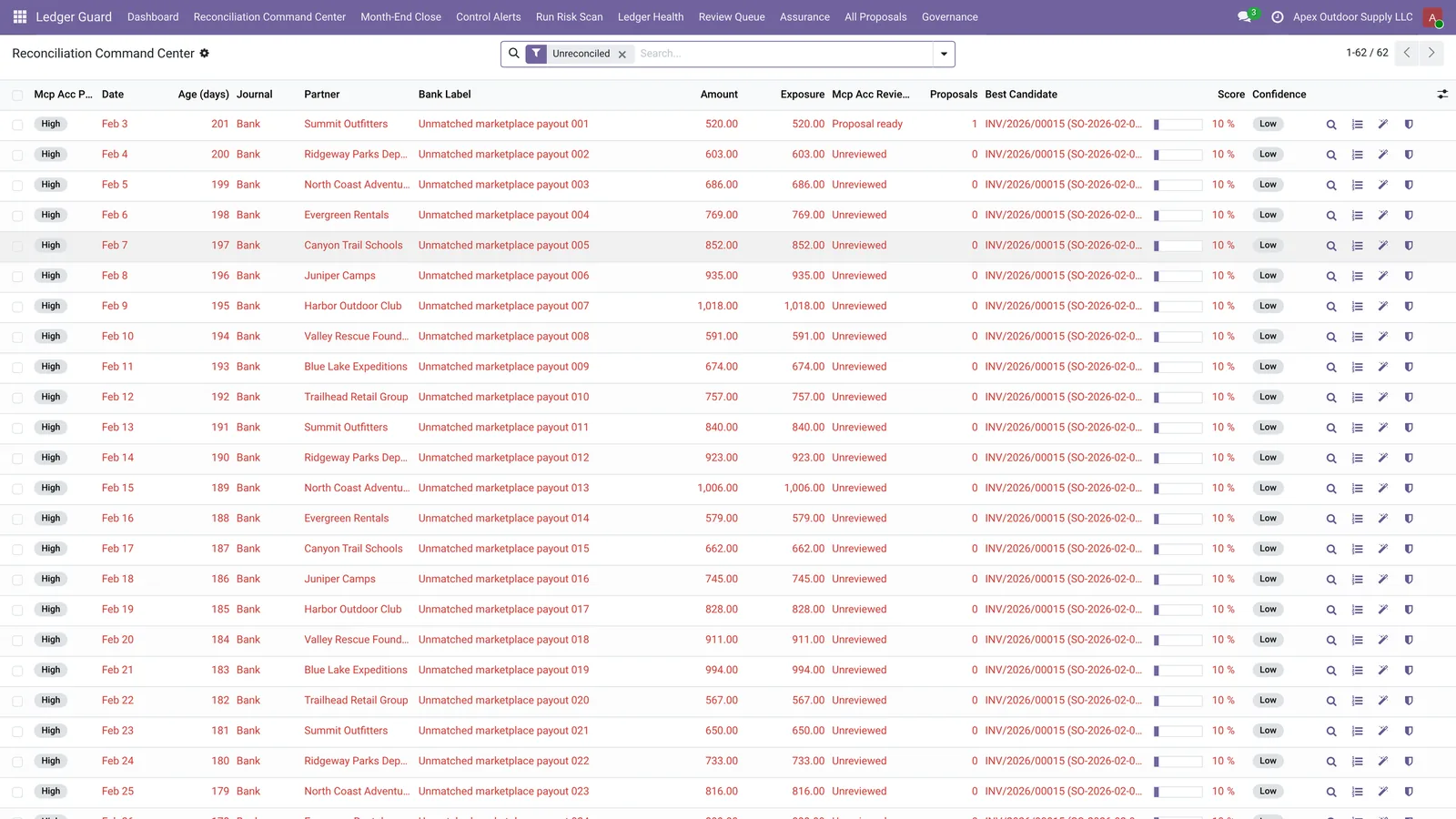
The Command Center lists every unmatched bank line with its age, amount, likely candidate, confidence and status, ordered so the costly and the long-outstanding rise to the top rather than the most recent.
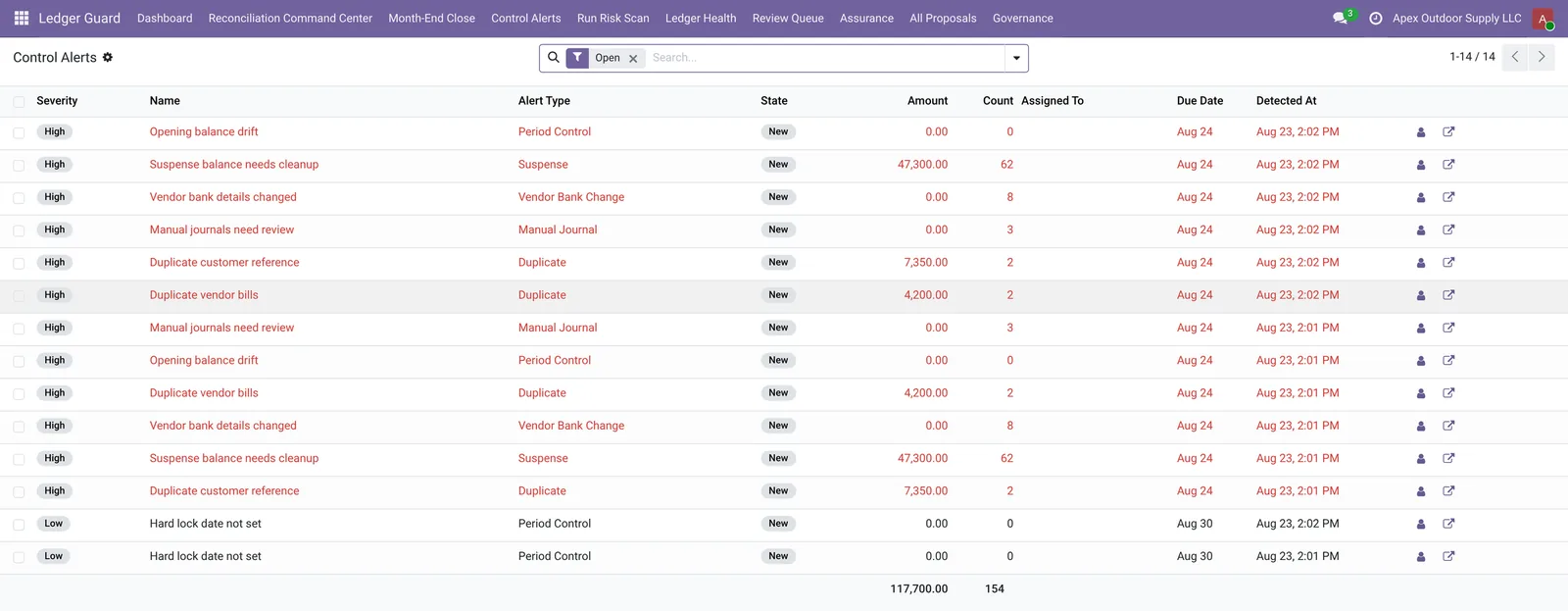
Control alerts
“What is actually dangerous?”
Control alerts separate risk from noise. Vendor bank-detail changes, duplicate bills, manual journal anomalies and period-lock gaps each carry a severity, an owner and a resolution lifecycle running from new through investigating to resolved.
Review Queue
“What needs my approval?”
The Review Queue holds every proposal waiting on a human, with its validation state and the evidence behind it. Nothing leaves the queue without a person acting on it, which is what keeps the accountant in control of the ledger.

Month-End Close
“Are we ready to close?”
The Month-End Close view turns the close into a tracked process. Each period shows its tasks, its blocking items and its progress, so readiness is a state anyone can read rather than a judgement one person holds.
Match suggestions and trends
“Is this getting better?”
Match suggestions rank candidates with confidence scoring, and the trends view plots ledger health across successive scans. Together they show whether the backlog is shrinking or the same exceptions keep returning each month.
Behind the score
A number nobody can interrogate is not assurance. Every figure the module reports opens into the working behind it.
The score, with its working
The scorecard breaks the headline number into its five dimensions — bank reconciliation, period integrity, verified ledger data, material exposure and payment monitoring — so the score can be argued with rather than merely accepted. Dimensions that cannot be assessed are left out of the denominator instead of being counted as passing.
The alert most finance teams never get.
A supplier emails to say their bank details have changed. The payment run goes out. Nobody notices for weeks. It is the most common invoice-fraud pattern there is, and standard Odoo has no alarm for it.
🏦
Vendor bank-detail changes
It flags when a supplier bank account changes, which is the point at which invoice redirection fraud succeeds or fails.
📄
Duplicate bills
Duplicate bills are surfaced before a second payment leaves, catching the same invoice entered twice through different routes.
🔁
Duplicate references
Repeated payment references across separate documents are flagged, a common signature of double entry and of duplicated supplier claims.
✍️
Manual journal anomalies
Manual journals that fall outside normal patterns are raised for review, including entries touching periods that were believed closed.
🌫️
Suspense drift
Balances accumulating in suspense accounts are tracked over time, because suspense is where unexplained money waits to become a write-off.
🔒
Period-lock gaps
Missing hard lock dates are reported, since an unlocked prior period means a closed number can still move without anyone noticing.
Find out whether your vendor bank details have changed.
The first scan reports every vendor bank-detail change, duplicate bill and manual journal anomaly it finds in your ledger. Ask us to run it.
Every decision leaves evidence an auditor can follow.
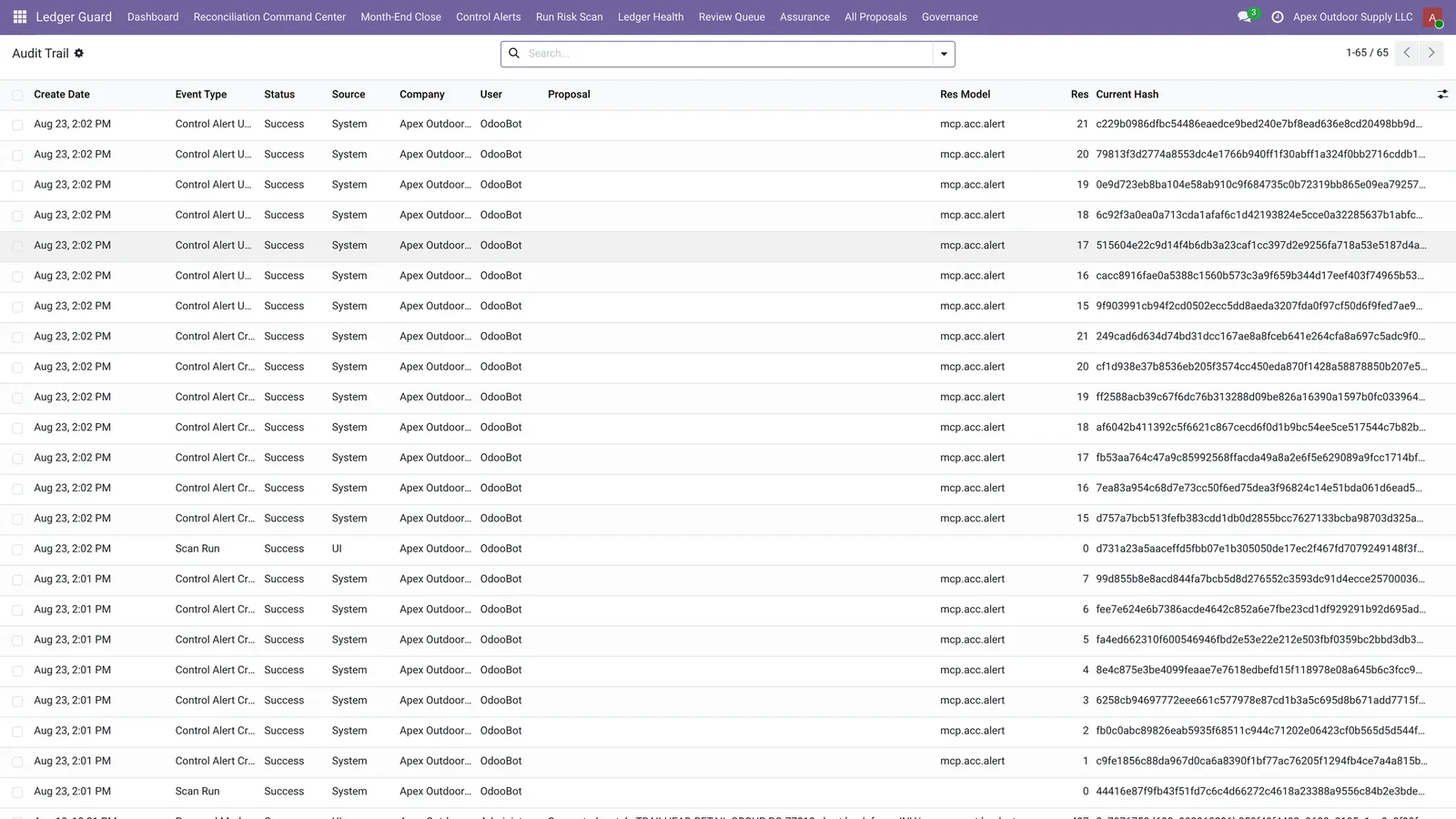
AI Accounting for Odoo records what was found, what was proposed, who approved it and what the records looked like at the time.
⛓️
Tamper-evident
Every scan, proposal, approval and execution is written into a hash chain. Alter one row directly in the database and chain verification identifies exactly which record changed.
📎
Evidence snapshots
Each proposal carries a snapshot of the records it was based on, so a reviewer months later sees the same evidence the approver saw at the time.
📑
PDF assurance report
A period can be exported as a PDF assurance report covering the score, the findings and their resolution, which is the artefact an auditor or a client actually asks for.
Bring your own AI. Or none at all.
Explanations run on local deterministic rules by default. No API key, no subscription, and no accounting data leaving your server. Connecting an OpenAI-compatible or Anthropic provider is optional and only changes how the explanation is worded.
With MCP Server for Odoo installed, AI Accounting for Odoo exposes nine accounting tools over the Model Context Protocol, so Claude, ChatGPT or any MCP client can work the same books in plain English. Eight of the nine tools are read-only.
- “How healthy are my books?”
- “Which bank lines are still unreconciled?”
- “Why didn't this one match?”
- “Propose a match for it.”
- “Prove nobody tampered with the audit log.”
AI Accounting for Odoo compared with the alternatives
Free Odoo reconciliation modules and Odoo’s own AI both rank candidate matches. Neither explains a failure, detects a changed vendor bank account, or leaves an audit trail.
| Capability | Free Odoo reconciliation modules | Odoo native AI | AI Accounting for Odoo |
|---|
| Ranks candidate matches | Yes | Yes | Yes |
|---|
| Explains why a match failed | No | No | Yes |
|---|
| Detects vendor bank-detail changes | No | No | Yes |
|---|
| Tamper-evident audit trail | No | No | Yes |
|---|
| Month-end close checklist | No | No | Yes |
|---|
| Works with Claude / ChatGPT | No | No | Yes |
|---|
What AI Accounting for Odoo does not do
Three limits worth knowing before you evaluate it, because they are the reasons some teams should not buy this module.
✋
Not an auto-poster
AI Accounting for Odoo does not run your reconciliation for you. It writes proposals, and a person decides. Teams wanting hands-off automatic posting across every match type should not buy this module.
🧑💼
Does not replace your accountant
AI Accounting for Odoo finds and explains exceptions; judgement about what they mean stays with the accountant. The module makes a qualified person faster, and gives an unqualified one nothing safe to act on.
🔗
Requires the MCP Server base module
AI Accounting for Odoo depends on MCP Server for Odoo, which is licensed separately, plus the standard Accounting app. Without the base module the nine MCP accounting tools are unavailable.
AI Accounting for Odoo — specifications
AI Accounting for Odoo is an AI accounting assurance module for Odoo 19 that scores how much of a ledger can be verified, explains why bank lines failed to reconcile, detects duplicate bills and vendor bank-detail changes, and records every decision in a tamper-evident audit trail.
| Odoo version | Odoo 19.0, Community and Enterprise |
|---|
| Dependencies | account, mail, mcp_server_odoo (licensed separately) |
|---|
| MCP tools exposed | 9 accounting tools, 8 of them read-only |
|---|
| Tool names | acc_recon_health, acc_scan_anomalies, acc_unreconciled, acc_explain_statement_line, acc_explain_entry, acc_ar_aging, acc_ap_aging, acc_propose_statement_line_match, acc_verify_audit_chain |
|---|
| Finding types | 9: suspense drift, unreconciled bank lines, duplicate bills, duplicate references, vendor bank-detail changes, manual journal anomalies, opening-balance drift, no bank statement activity, missing hard lock date |
|---|
| Alert types | Reconciliation, suspense, duplicate, vendor bank change, manual journal, period control, health score drop |
|---|
| Alert severities | High, medium, low, info |
|---|
| Alert lifecycle | New → investigating → waiting → resolved → dismissed |
|---|
| Score dimensions | 5: bank reconciliation, period integrity, verified ledger data, material exposure, payment monitoring |
|---|
| Unassessable dimensions | Left out of the denominator rather than scored as passing |
|---|
| AI provider | Local deterministic rules by default; OpenAI-compatible and Anthropic providers optional |
|---|
| Controlled execution | Exact one-to-one matches only, off by default, requires fresh ledger replay and a second approver, reversible with a recorded reason |
|---|
AI Accounting for Odoo — frequently asked questions
Does the AI post journal entries to my Odoo ledger?
No, not by default. AI Accounting for Odoo writes a proposal, never a direct posting. Controlled execution exists only for exact one-to-one reconciliations, and it stays disabled until a manager enables it in company policy. Even then it requires a fresh ledger replay that re-validates the match against Odoo's own accounting engine, plus a second approver who is not the proposal creator, and it can be reverted with a recorded reason.
What is a ledger replay?
A ledger replay is a side-effect-free simulation. Before a proposal can be approved, AI Accounting for Odoo replays the proposed reconciliation against Odoo's accounting engine and compares the actual result with what the proposal claims. If the bank line, candidate or policy changed since validation, it refuses and asks for revalidation.
Do I need an OpenAI or Anthropic API key to use AI Accounting for Odoo?
No. AI accounting explanations run on local deterministic rules by default, so there is no API key, no subscription and no data leaving your server. You can optionally connect an OpenAI-compatible or Anthropic provider if you want richer narrative explanations.
Can I use AI Accounting for Odoo from Claude or ChatGPT?
Yes. AI Accounting for Odoo exposes nine accounting tools over the Model Context Protocol, so an AI assistant can check ledger health, list unreconciled bank lines, explain why a match failed, or verify the audit chain in plain English against your live Odoo books. Eight of the nine tools are read-only. This requires the MCP Server for Odoo base module.
How is AI Accounting for Odoo different from free Odoo reconciliation modules?
Free Odoo reconciliation modules rank candidate matches and stop. None of them explains why a match failed, none produces evidence snapshots, and none has a tamper-evident audit trail. This module is not a matcher; it is the assurance layer that explains exceptions and proves what was done about them.
Which Odoo versions does AI Accounting for Odoo support?
AI Accounting for Odoo supports Odoo 19.0, both Community and Enterprise. It depends on the standard Accounting app and on MCP Server for Odoo, which is licensed separately.
Is the first scan safe to run on production data?
Yes. The risk scan is read-only and cannot modify any accounting record. It reads the ledger, scores verified coverage and lists exceptions.
Run one scan on your own books.
Installation takes minutes and the first scan is read-only, so it cannot change anything. You will have a score, a list of exceptions and a figure for your exposure before you decide whether this is worth paying for.
- Odoo 19 Community & Enterprise
- Read-only first scan
- No AI key needed
- Free install & support