One-time payment for Odoo 18.0, 19.0. No subscription.
The module, with full source code, downloaded straight after payment
A 1:1 setup video call and 3 months of email support from the people who build it
14-day refund if we cannot make it work on your Odoo
Want the full AI stack? MCP Complete adds MCP Insight Analytics and AI Accounting with 2 hours of onboarding, for €1,490 in total.
Secure card payment by Razorpay · instant download
Is MCP Insight Analytics right for your setup?
Teams building dashboards and asking questions against live Odoo data.
Compatibility and purchasing
Odoo versions
Odoo 18.0, 19.0
Installation
Self-hosted, Odoo.sh or on-premise. Custom modules cannot be installed on Odoo Online.
How to buy
Buy directly from KSRO Labs on this page for €590 — pick your Odoo version and download straight after payment.
Setup support
Included: a 1:1 setup video call and 3 months of email support. Reply to your receipt email to book the call. Custom workflows and report modelling are scoped separately.
Check your setup before buying
Choose your hosting and Odoo version to check the installation path.
Turn live Odoo data into governed dashboards, evidence-backed answers, and predictive signals. Role-based dashboards for executives, finance, sales, and operations, built from natural language — with every figure drilling back to the Odoo record behind it. Reads Odoo in place, so there is no separate reporting warehouse to build or keep in sync.
MCP Insight — AI Analytics & Executive Dashboards for Odoo: quick facts
What it is
Governed Odoo dashboards, AI answers, and predictive signals built on live data.
Category
Analytics & BI
Odoo compatibility
Odoo 18.0, 19.0
Price
€590 one-time, direct from KSRO Labs — instant download, including the MCP Server for Odoo it requires. Setup help included.
Key capabilities
Role-based dashboards · Build and ask in plain English · Forecasts and recommended actions · Drill down to the source record
Inside Odoo
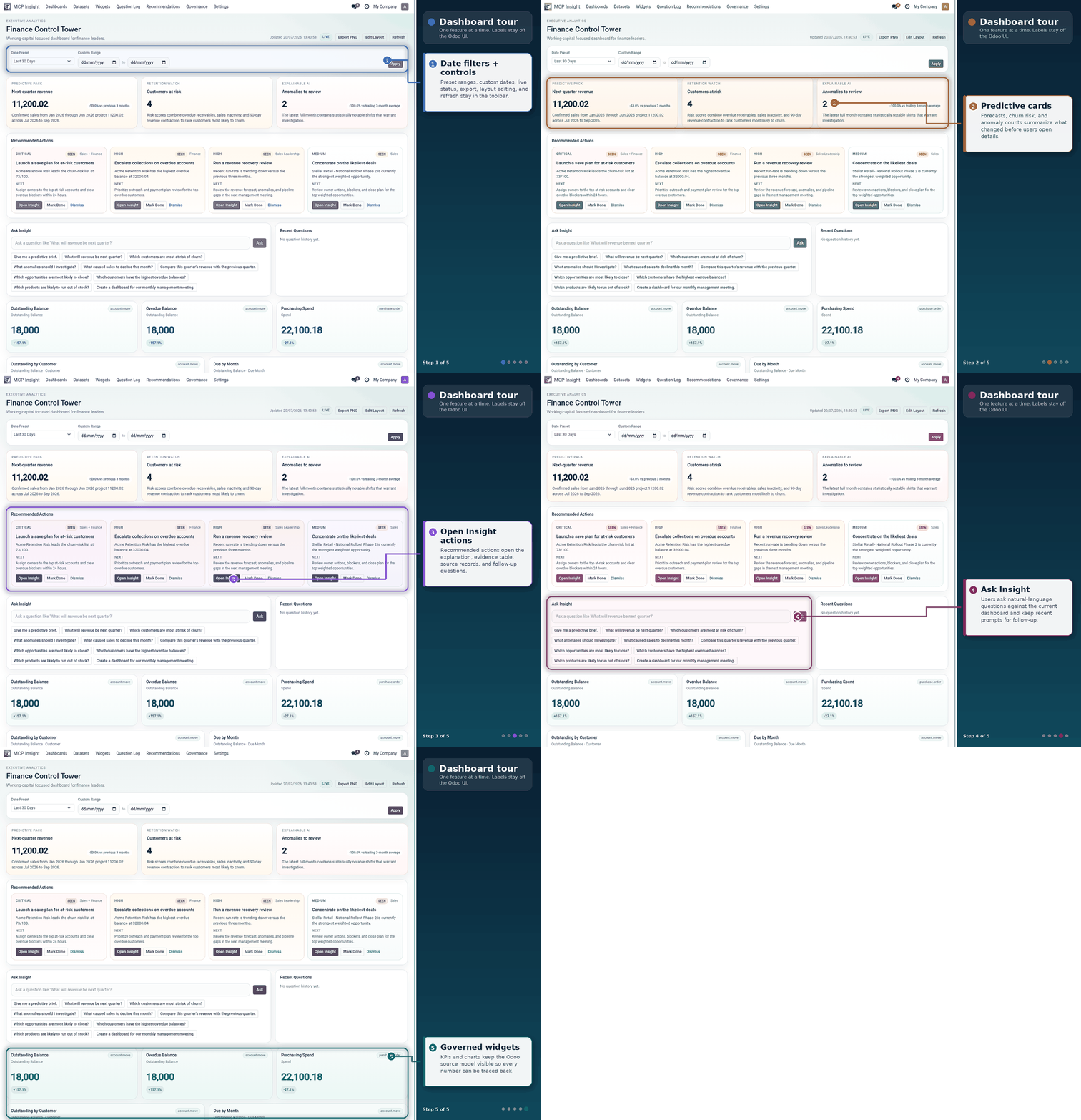
A live dashboard that shows the next action, not just the last number.
Date filters, predictive cards, recommended actions, Ask Insight and drill-down widgets in one Odoo screen, reading live records — no exports and no separate reporting database.
The dashboard workspace in Odoo. (animated)
The reality today
The numbers are already in Odoo. Getting them out is the problem.
The monthly grind
Reporting eats days
Someone senior spends the first week of the month assembling a deck that is out of date when it is sent.
The credibility gap
Two versions of “revenue”
Finance and sales bring different numbers to the same meeting, and the meeting becomes about the numbers.
The follow-up wall
“Can you break that down?”
The question that matters costs another two days, so it quietly stops being asked.
Ask Insight
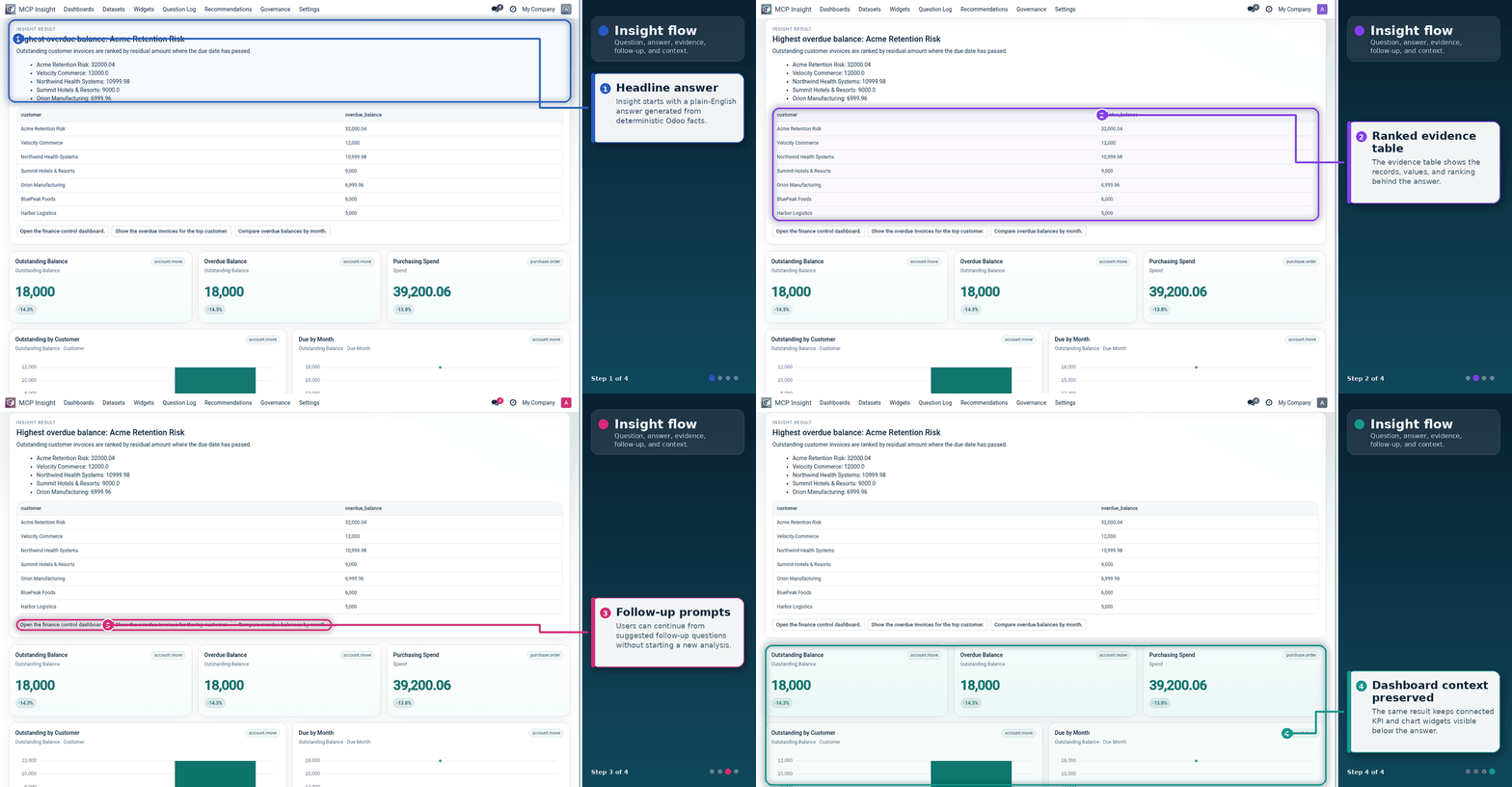
Click Insight and get the evidence, not just a sentence.
Open Insight on a recommended action, click a predictive card or type a question. Insight applies the dashboard’s filters, calculates the facts in Odoo, and returns a headline, a summary, a ranked evidence table and follow-up prompts. Calculations are deterministic Odoo queries; the optional AI layer only writes the narrative around facts that already exist.
Revenue & forecast
“What will revenue be next quarter?” · “Why did sales drop this month?”
Risk & cash
“Which customers have the highest overdue balances?” · “Where are we most at risk of stockouts?”
Pipeline & action
“Which opportunities are most likely to close this month?” · “What should I act on this week?”
Insight answers with the records behind them. (animated)
Built per role
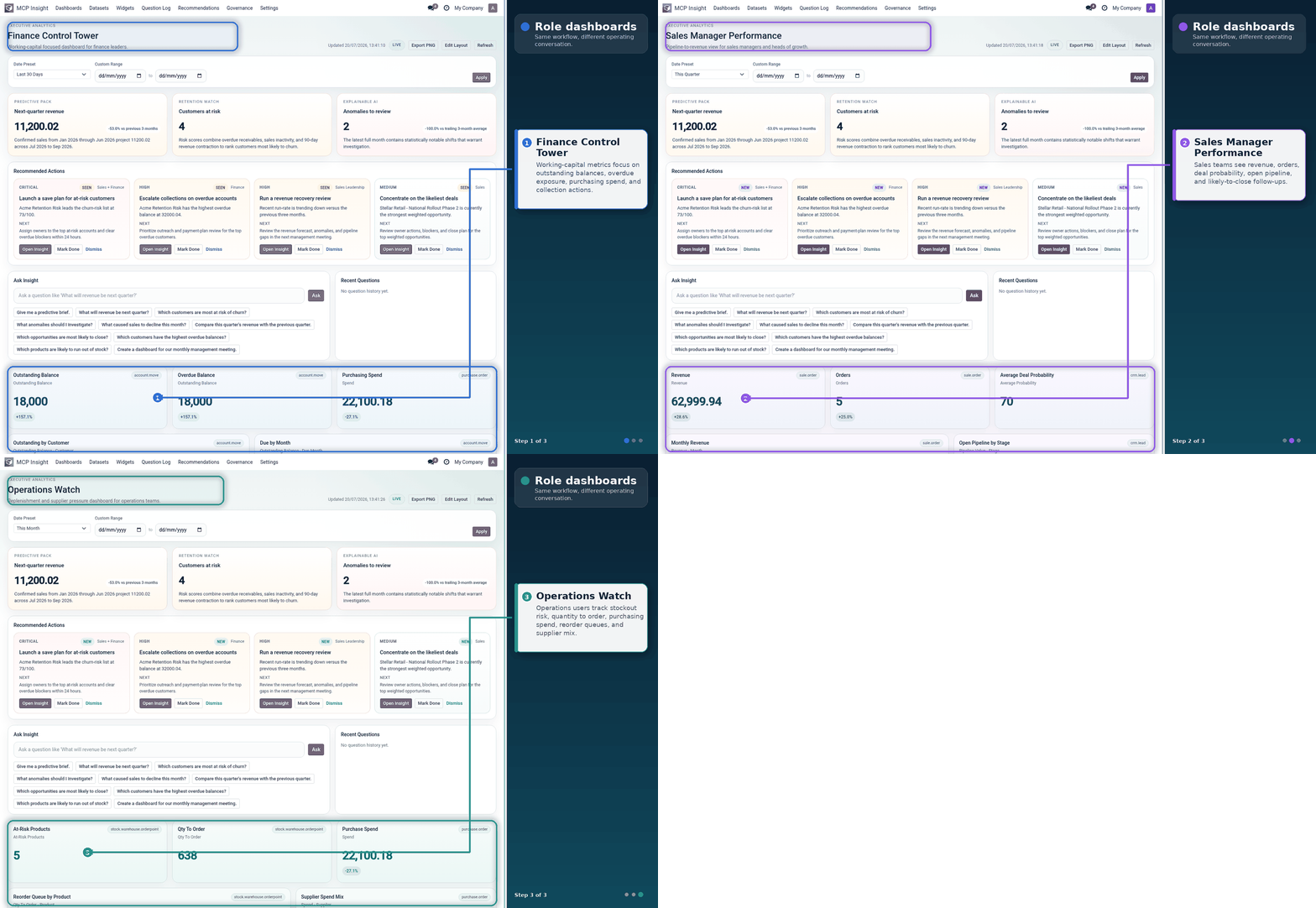
Finance, sales and operations each get their own cockpit.
Templates on install: Contacts Overview, CEO Daily Brief, Finance Control Tower, Sales Manager Performance, Operations Watch and a Monthly Management Review board pack — the same toolbar and Insight panel, framed around each team’s conversation.
Role dashboards: finance cash controls, sales pipeline, operations replenishment. (animated)
Portal pages and board packs
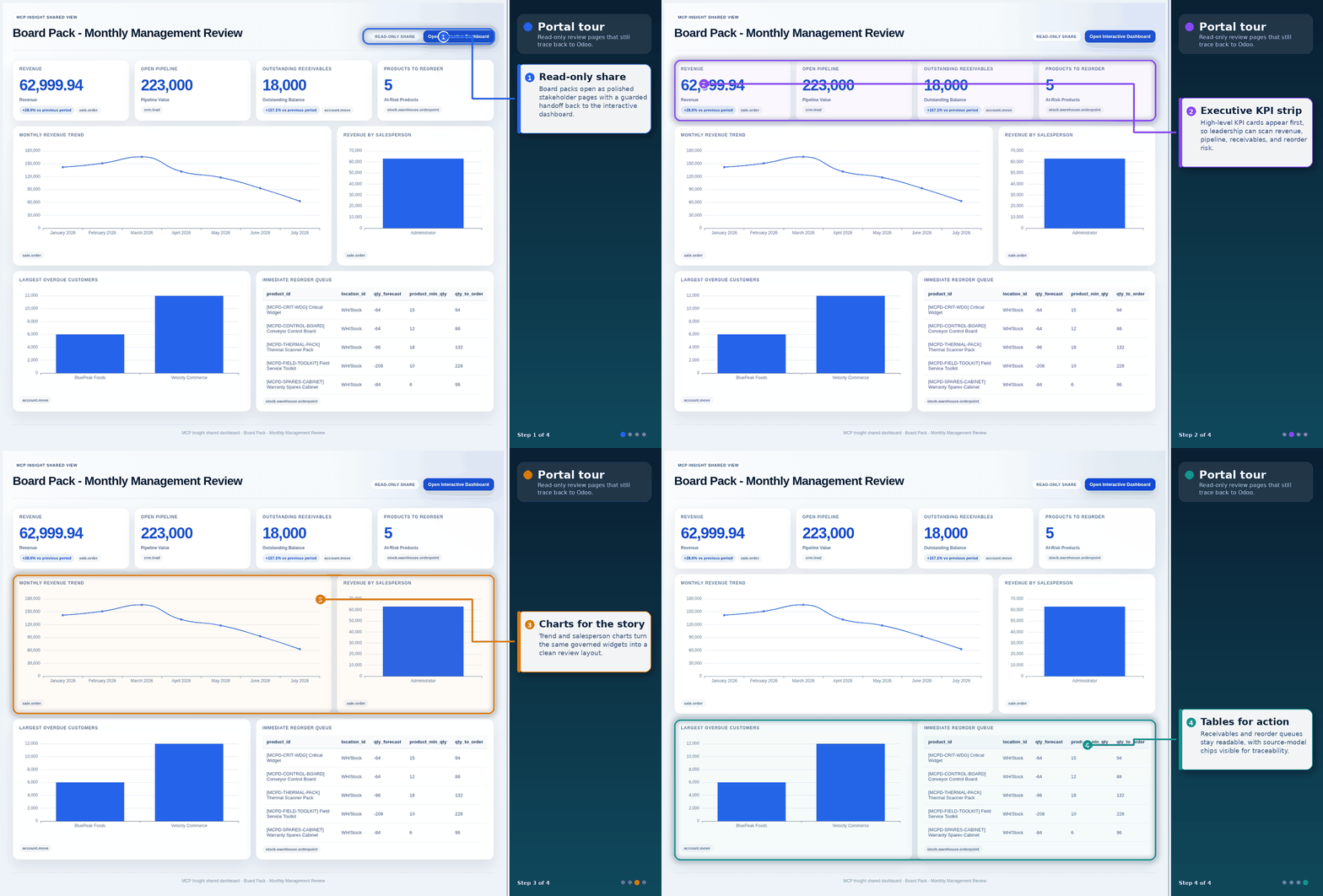
Share the answer without giving everyone a backend seat.
A board pack shared as a read-only portal page. (animated)
Read-only share links
Every dashboard can create a tokenised read-only URL for stakeholders.
Board-pack layouts
KPIs, revenue trend, receivables, salesperson performance and reorder queues on one review page.
Safe handoff
Recipients cannot edit layouts or filters; internal users can open the interactive dashboard.
Audited sharing
Creating and opening a share are logged as analytics events.
Honest comparison
What standard charts and custom pages do not give you.
Capability
Standard Odoo charts
Custom report page
AI Dashboards (MCP Insight)
Role-based dashboards
Limited, app-specific
Custom build required
Executive, finance, sales, operations templates on install
Plain-English questions
No
No
Yes, with governed answers and logged history
Predictive signals
Usually no
Only with custom code
Forecasts, anomalies, churn and stockout risk
Metric governance
Minimal
Minimal
Registry with owners, versions and states
Stakeholder sharing
Screenshot or export
Build and maintain your own
Read-only board-pack link, still live next week
AI / MCP delivery
No
No
MCP tools on the same security model
Trust layer
Built to survive “where did that number come from?”
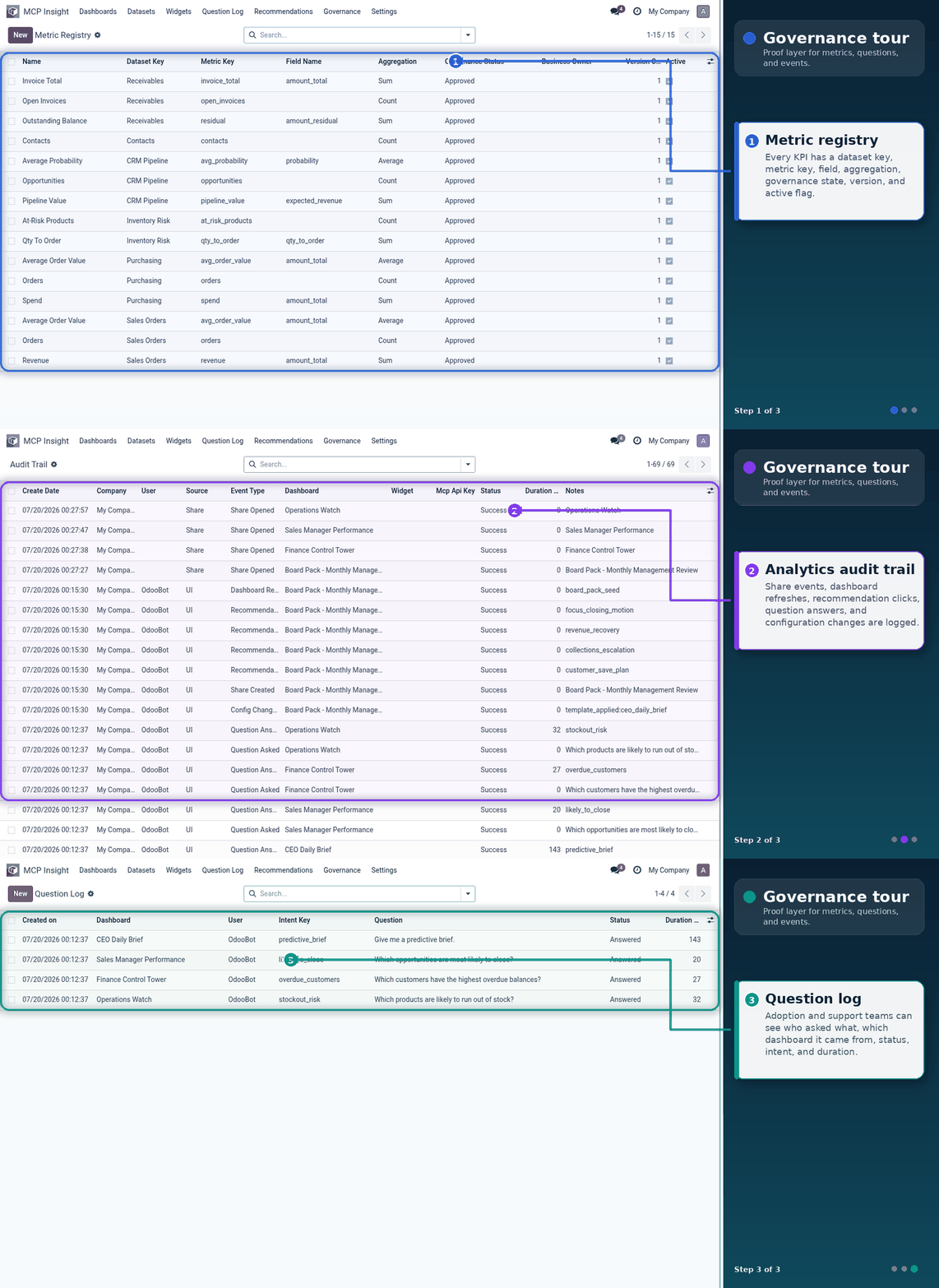
Every metric has an owner, a definition and version history. Every question is logged with its intent, dashboard, status and response time, and analytics events are kept in an append-only trail with configurable retention.
Metric registry, audit trail and question log. (animated)
Everything included
One definition per metric, four places to use it.
Dashboards
Templates for CEO, finance, sales, operations and a board pack
KPI, chart and table widgets on sales, CRM, invoices, purchases, inventory and contacts
Date presets, live refresh, Export PNG, Edit Layout, drill-down
Answers and AI
Insight answers with headline, evidence and follow-ups
AI narrative is off by default; provider, key and model set in Odoo settings
MCP tools: list and fetch dashboards, answer governed questions, create dashboards from approved templates
Requirements
Requires the MCP Server for Odoo (installed as a dependency)
Recorded against a demo Odoo database with fictional data.
AI Dashboards for Odoo: Ask Your Business Questions
Four dashboards on live Odoo records with a three-month trend forecast, customers at risk, anomalies and recommended actions — ask about them through Claude or on the dashboard.
Common questions about the MCP Insight — AI Analytics & Executive Dashboards for Odoo.
Does this need a separate data warehouse?
No. The module reads live Odoo data in place, so there is no warehouse to provision, no sync schedule to maintain, and no window where the dashboard disagrees with Odoo. If you also need cross-system reporting outside Odoo, the BigQuery Connector remains the right tool for that job.
Can I trust an AI-generated number in a dashboard?
The business facts are calculated by Odoo, not by the model — the AI layer explains results Odoo has already computed. Every figure drills down to the underlying records, so any number can be traced to its source.
Do existing Odoo permissions apply to dashboards?
Yes. Access rights and record rules are enforced throughout, so a user only sees records they could already open in Odoo. Dashboard activity and analytics access are logged for audit.
How does this relate to the MCP Server?
MCP Insight is built on the same governed foundation as MCP Server PRO. The MCP Server connects external AI clients such as Claude and ChatGPT to Odoo; MCP Insight delivers dashboards and AI answers inside Odoo itself. They complement each other and can run together.
Which Odoo versions are supported?
Published builds: Odoo 18.0, 19.0, checked 2026-11-07. Select your exact version on the App Store before purchase. The installed module requires self-hosted Odoo, Odoo.sh or on-premise hosting; Odoo Online does not allow custom modules.
You may also need
Other KSROlabs modules that pair well with MCP Insight — AI Analytics & Executive Dashboards for Odoo.
AI / MCP
MCP Server
Connect Claude, GPT, and AI agents to live Odoo data. Self-hosted module or fully managed deployment — available online.